Tuesday, May 2, 2017

linux cpu core and socket count

[root@db-oracle-node1 ~]# grep -c ^processor /proc/cpuinfo
24
[root@db-oracle-node1 ~]# nproc --all
24
[root@db-oracle-node1 ~]#  lscpu | grep 'socket'
Core(s) per socket:    6

Wednesday, April 12, 2017

Counting Duplicate Record SQL on single Table

SELECT   INSTITUTE_ID, SL_NO, ROOM_NO, SIZE_NO, class_name, 
COUNT (*) dup_rec    FROM   class_rooms GROUP BY
INSTITUTE_ID, SL_NO, ROOM_NO, SIZE_NO, class_name  HAVING   COUNT (*) > 1
and INSTITUTE_ID is not null and SL_NO is not null and
ROOM_NO is not null and SIZE_NO is not null and   class_name is not null
order by INSTITUTE_ID desc, SL_NO, ROOM_NO, SIZE_NO, class_name;


select INSTITUTE_ID, SL_NO, ROOM_NO, SIZE_NO, class_name from
class_rooms where institute_id=35065 and class_name='Six' order by institute_id;


SELECT INSTITUTE_ID, SL_NO, ROOM_NO, SIZE_NO, class_name,
COUNT(*) OVER(PARTITION BY INSTITUTE_ID, SL_NO, ROOM_NO, SIZE_NO, class_name) AS NumberOfDuplicates
FROM CLASS_ROOMS;

Tuesday, April 11, 2017

How to spool oracle sql output in xcel file

SQL> SET PAGESIZE 40000

SQL> SET FEEDBACK OFF

SQL> SET MARKUP HTML ON

SQL> SET NUM 24

SQL> SPOOL niger_duplicate.xls
 
SQL> SELECT INSTITUTE_ID,ROOM_NO, SIZE_NO,CLASS_NAME,
NO_BENCH,
NO_CHAIR,
NO_TABLE,
WRITNG_BOARD,
NO_FAN,
NO_LIGHT,
PARTITION_TYPE,
SL_NO,
MULTIMEDIA,
IS_ELECTRICITY
FROM class_rooms 
GROUP BY SIZE_NO,
CLASS_NAME,
NO_BENCH,
NO_CHAIR,
NO_TABLE,
WRITNG_BOARD,
NO_FAN,
NO_LIGHT,
PARTITION_TYPE,
INSTITUTE_ID,
SL_NO,
ROOM_NO,
MULTIMEDIA,
IS_ELECTRICITY 
HAVING count(*) > 1
order by SL_NO,institute_id;  


SQL>

SQL>SPOOL OFF

SQL>SET MARKUP HTML OFF

SQL>SPOOL OFF
 
 you can find the spool output in your current directory.
default directory  
 

Monday, March 20, 2017

ORA-09925: Unable to create audit trail file Linux-x86_64 Error: 2: No such file or directory Additional information: 9925

[oracle@dr dbs]$ sqlplus / as sysdba

SQL*Plus: Release 12.1.0.2.0 Production on Sun Mar 19 20:11:28 2017

Copyright (c) 1982, 2014, Oracle.  All rights reserved.

Connected to an idle instance.

SQL> create spfile from pfile;


SQL> startup;
ORA-09925: Unable to create audit trail file
Linux-x86_64 Error: 2: No such file or directory
Additional information: 9925


Go to oracle parameter file and check the audit trail file directory name : (in this case i have wrong i put small letter directory but actual directory will be capitap letter i just change audit trail directory name in Capital letter which have actual one)


[oracle@dr ~]$ cd /u01/app/oracle/product/12.1.0.2/db_1/dbs/
[oracle@dr dbs]$ ls
hc_orcl.dat  hc_stby.dat  initstby.ora  lkDUMMY  orapwstd
[oracle@dr dbs]$ cat initstby.ora
orcl.__data_transfer_cache_size=0
orcl.__db_cache_size=142606336
orcl.__java_pool_size=4194304
orcl.__large_pool_size=8388608
orcl.__oracle_base='/u01/app/oracle'#ORACLE_BASE set from environment
orcl._oracle_home='$ORACLE_BASE/product/12.1.0.2/db_1'
orcl.__pga_aggregate_target=394264576
orcl.__sga_target=335544320
orcl.__shared_io_pool_size=12582912
orcl.__shared_pool_size=159383552
orcl.__streams_pool_size=0
*.audit_file_dest='/u01/app/oracle/admin/orcl/adump'
*.audit_trail='db'
*.compatible='12.1.0.2.0'
*.control_files='/u01/app/oracle/oradata/orcl/control01.ctl','/u01/app/oracle/re                                       covery_area/orcl/control02.ctl'
*.db_block_size=8192
*.db_domain=''
*.db_file_name_convert='stby','orcl'
*.db_name='orcl'
*.db_unique_name='stby'
*.db_recovery_file_dest='/u01/app/oracle/fast_recovery_area'
*.db_recovery_file_dest_size=4560m
*.diagnostic_dest='/u01/app/oracle'
*.dispatchers='(PROTOCOL=TCP) (SERVICE=orclXDB)'
*.fal_server='ORCL'
*.local_listener='LISTENER_ORCL'
*.log_archive_config='DG_CONFIG=(orcl,stby)'
*.log_archive_dest_2='SERVICE=orcl NOAFFIRM ASYNC VALID_FOR=(ONLINE_LOGFILES,PRI  MARY_ROLE) DB_UNIQUE_NAME=ORCL'
*.log_archive_dest_state_2='ENABLE'
*.log_archive_format='%t_%s_%r.arc'
*.log_archive_max_processes=30
*.log_file_name_convert='stby','orcl'
*.memory_target=696m
*.open_cursors=300
*.processes=300
*.remote_login_passwordfile='EXCLUSIVE'
*.standby_file_management='AUTO'
*.undo_tablespace='UNDOTBS1'
[oracle@dr dbs]$ vi initstby.ora
[oracle@dr dbs]$ vi initstby.ora
[oracle@dr dbs]$ cd
[oracle@dr ~]$ export ORACLE_HOME
[oracle@dr ~]$ export ORACLE_SID
[oracle@dr ~]$ . .bash_profile
[oracle@dr ~]$ sqlplus / as sysdba

SQL*Plus: Release 12.1.0.2.0 Production on Sun Mar 19 21:19:30 2017

Copyright (c) 1982, 2014, Oracle.  All rights reserved.

Connected to an idle instance.

SQL> startup
ORACLE instance started.

Total System Global Area  729808896 bytes
Fixed Size                  2928680 bytes
Variable Size             557846488 bytes
Database Buffers          163577856 bytes
Redo Buffers                5455872 bytes

Sunday, March 19, 2017

REMAP_SCHEMA import one schema data to different name another schema data


IF you want to copy your one database schema to another same metadata and all dml datain another different database but different name schema you just import with following command


Syntax and Description
REMAP_SCHEMA=source_schema:target_schema


expdp system/abc123 SCHEMAS=hr DIRECTORY=DATA_PUMP_DIR DUMPFILE=hr.dmp version=11.1.0.6.0 (if version incompatible)


impdp system DIRECTORY=DATA_PUMP_DIR DUMPFILE=BBS_PDS19032017.dmp REMAP_SCHEMA=hr:scott


For Reference:https://docs.oracle.com/database/121/SUTIL/GUID-619809A6-1966-42D6-9ACC-A3E0ADC36523.htm#SUTIL927

ORA-01940: cannot drop a user that is currently connected

SQL>  drop user SID;
 drop user SID
*
ERROR at line 1:
ORA-01940: cannot drop a user that is currently connected


SQL> select sid,serial# from v$session where username = 'SID';

       SID    SERIAL#
---------- ----------
       125       2058

SQL> ALTER SYSTEM KILL SESSION '125,2058#';
ALTER SYSTEM KILL SESSION '125,2058#'
*
ERROR at line 1:
ORA-00026: missing or invalid session ID


SQL> ALTER SYSTEM KILL SESSION '125,2058';

System altered.

SQL> select sid,serial# from v$session where username = 'SID';

       SID    SERIAL#
---------- ----------
       125       2058

SQL> drop user SID;

User dropped.

Saturday, March 18, 2017

ORA-01078: failure in processing system parameters

When you getting ORA-01078: failure in processing system parameters
LRM-00109: could not open parameter file "String"  Dont be upset.
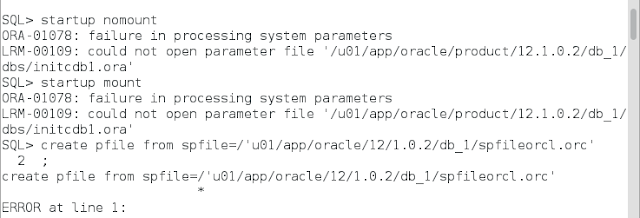

ora-01078
Ora-01078


Just execute /load oracle bash_profile
. .bash_profile

[oracle@dcAdg ~]$ sqlplus / as sysdba

SQL*Plus: Release 12.1.0.2.0 Production on Thu Mar 16 22:03:45 2017

Copyright (c) 1982, 2014, Oracle.  All rights reserved.


Connected to:
Oracle Database 12c Enterprise Edition Release 12.1.0.2.0 - 64bit Production
With the Partitioning, OLAP, Advanced Analytics and Real Application Testing options

If you have Two database on same oracle_home , that means you create new database with dbca

you need to load /execute bash_profile .
set environment SET ORACLE_SID=ORCL
[oracle@dcAdg ~]$ . oraenv
ORACLE_SID = [orcl] ? orcl

sqlplus / as sysdba

You may loging first database with default bash_profile .

If you set another database environment you can create another bash_script:

mkdir valut
vim  orasidpds.sh

Writer following line with new database sid (just copy bash_profile line and changed only oracle_sid):

ORACLE_BASE=/u01/app/oracle; export ORACLE_BASE
ORACLE_HOME=$ORACLE_BASE/product/11.1.0/db_1; export ORACLE_HOME
ORACLE_SID=sidpds; export ORACLE_SID
ORACLE_TERM=xterm; export ORACLE_TERM
PATH=$ORACLE_HOME/bin:/usr/sbin:$PATH; export PATH

.


When you want to loging new database just execute the orasidpds.sh script.

.orasidpds.sh


When oracle database startup that time control file check its all file , database, datafile location , sid .
this information are write on spfile, parameter file . database first find spfile for verify its initialization parameter if not found spfile data then go to pfile for initialization . so for risk free you can create a pfile from spfile where mirror copy keep for start up database.